
top free ai voice generators online can save a video project when you need clean narration fast, but the “free” part usually comes with limits that matter, like monthly character caps, export restrictions, or commercial-use rules.
If you’re making YouTube videos, TikToks, ads, training clips, or product demos, voice quality and licensing can quietly decide whether your video feels polished or awkward. The tricky part is that many tools sound great in a demo, then fall apart when you try longer scripts, specific pronunciations, or consistent voice tone across episodes.
This guide focuses on what editors and creators actually care about: naturalness, pronunciation control, export formats, captions workflow, and whether you can safely monetize your content. I’ll also include a quick decision checklist, a comparison table, and a simple “pick-by-scenario” playbook.
What “Free” Really Means for AI Voice Tools in 2026
Most free tiers are designed for testing, not full production. That’s not bad, it just means you should expect trade-offs. In practice, “free” often looks like one (or more) of these:
- Character or minutes caps per month, which you hit faster than expected once you start iterating.
- Limited voices (fewer accents, fewer ages, fewer “natural” options).
- Watermarked exports or lower audio quality on the free plan.
- Restricted commercial usage (fine for personal projects, unclear for monetized channels).
- Fewer controls for pacing, emphasis, pronunciation, and emotion.
Also, licensing is the part people skip until it becomes a problem. According to the U.S. Copyright Office, copyright and authorship questions around AI-generated material can be nuanced; when money is involved, it’s worth reading the platform’s terms and keeping your own documentation.
Quick Comparison Table: Top Options to Try First
Tools change quickly, and free tiers change even faster, so treat this table as a “starting shortlist” rather than a permanent ranking. You’ll still want to confirm current limits on each pricing page.
| Tool | Best for | Free tier reality check | Why creators like it |
|---|---|---|---|
| ElevenLabs | Natural narration | Free minutes/characters are limited; voice features vary by plan | Very natural cadence, strong voice quality |
| PlayHT | Quick voiceover drafts | Free exports may be capped; some voices gated | Fast workflow, lots of voice styles |
| Murf | Marketing-style reads | Free often oriented to previews; licensing depends on plan | Solid “brand voice” vibe for explainers |
| Descript | Video + audio editing in one place | Free plan is great for editing; voice features may be limited | Script-based editing, captions, timeline simplicity |
| CapCut | Short-form video workflow | Free features rotate; some voices/effects can be region-limited | Built for creators, easy text-to-speech in editing flow |
| Google Cloud TTS | Developers, scalable apps | Trial credits rather than “forever free” | Reliability, SSML control, many languages |
| Amazon Polly | Apps and automation | Free tier is time-limited then usage-based | SSML, stable infrastructure |
Key takeaway: if you want “free forever,” creator-focused editors (like CapCut) may feel easiest, but if you want consistent control, TTS APIs (Google/Amazon) tend to be more predictable once you accept usage-based pricing.
Top Free AI Voice Generators Online (What They’re Actually Good At)
Rather than pretending there’s one “winner,” it’s more useful to match tools to the job. Here’s how the commonly searched options tend to fit real workflows.
ElevenLabs (for natural-sounding narration)
If your biggest pain is “it sounds robotic,” this is usually where people start. The free tier is typically enough to test a few scripts, evaluate voices, and see how it handles tricky names.
- Strength: natural cadence and clarity for longer narration.
- Watch for: free limits can feel tight once you iterate multiple takes.
PlayHT (for variety and fast drafts)
PlayHT often appeals when you want multiple voice options quickly, especially for testing different tones (calm, upbeat, documentary).
- Strength: lots of voice styles and quick generation.
- Watch for: some exports, licenses, or voice models may be tied to paid plans.
Murf (for marketing and explainer videos)
Murf tends to fit scripts that need “confident, brand-safe” delivery. Many creators use it when they want a steady corporate-style read.
- Strength: polished tone for product and training content.
- Watch for: confirm commercial use if you monetize.
Descript (for people who edit first, voice second)
Descript shines when you want a single workspace for cutting video, cleaning audio, and handling captions. Even if you don’t rely on AI voice heavily, the editing workflow can reduce time.
- Strength: script-style editing, captioning, quick revisions.
- Watch for: voice options and limits vary, so check what’s included in your plan.
CapCut (for TikTok/Reels/Shorts creators)
If your workflow lives on templates, effects, and fast publishing, CapCut’s text-to-speech can be “good enough” and convenient because it stays inside the editor.
- Strength: speed and simplicity for short-form content.
- Watch for: voice availability can change; not all voices sound natural for long scripts.
Google Cloud TTS / Amazon Polly (for teams and automation)
These are less “fun creator tools” and more infrastructure. If you need repeatable output, SSML control (a markup language that controls pauses, emphasis, pronunciation), and stable availability, these are reliable picks.
- Strength: SSML, predictable output, developer-friendly.
- Watch for: not truly free long term; you’ll usually start on trial credits.
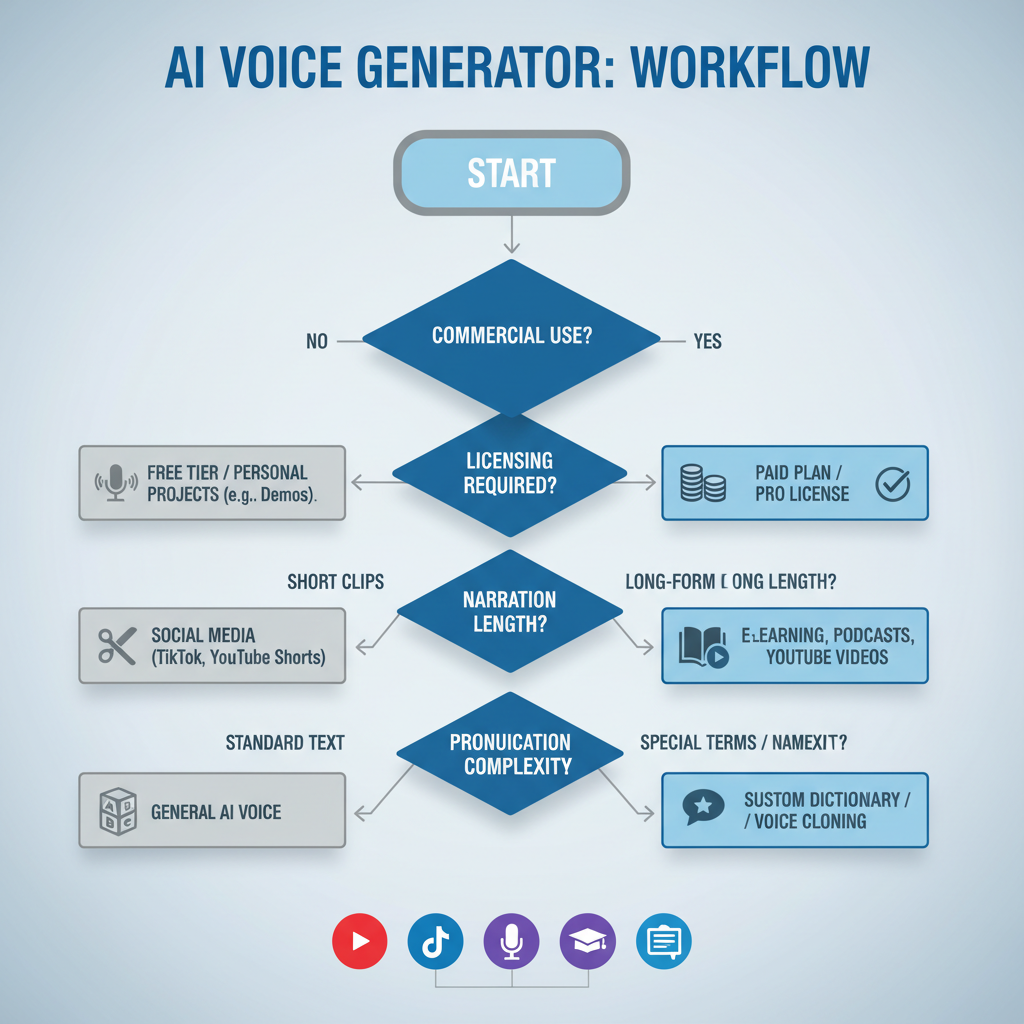
A Fast Self-Check: Which Tool Type Should You Use?
If you’re stuck, don’t overthink it. Answer these quickly and you’ll narrow down the right category of top free ai voice generators online for your situation.
- Is this video monetized or for a client? If yes, put licensing clarity above “cool voices.”
- Is your script longer than 2–3 minutes? If yes, prioritize natural pacing and consistent tone.
- Do you need to fix pronunciation often? If yes, look for pronunciation dictionaries or SSML support.
- Do you publish weekly? If yes, pick a tool with steady limits and repeatable workflow.
- Are you editing on mobile? If yes, an editor-integrated option is usually easier than a web-only TTS tool.
Rule of thumb: editor-integrated tools win on speed, dedicated voice platforms win on realism, cloud TTS wins on control and scale.
Practical Workflow: How to Get Better Voiceovers (Even on Free Plans)
Most “bad AI voice” outcomes come from script issues, not the model. A few small habits make free tools sound dramatically better.
1) Rewrite for speaking, not reading
- Keep sentences shorter than you think you need.
- Use contractions (it’s, you’re) if the tone allows.
- Write numbers the way you want them spoken (e.g., “twenty twenty-six”).
2) Build a pronunciation plan
- Create a short “do not mispronounce” list for brand names, people, and places.
- Test those words early, before generating the full script.
- If the tool supports SSML, use it sparingly for pauses and emphasis.
3) Generate in sections, not one giant block
This sounds tedious, but it prevents a common failure mode: one odd sentence ruins the pacing for the entire track. Split by scene or paRAGraph, then stitch together in your editor.
4) Do light post-processing
- Normalize loudness so your voice sits well under music.
- Trim harsh sibilance if it jumps out on headphones.
- Leave small breaths if the voice feels too “dead,” but don’t fake realism too hard.
According to Adobe, clear, consistent audio levels are a major factor in perceived production quality; even basic leveling can make narration feel more professional.
Common Mistakes (That Waste Time or Create Monetization Risk)
- Assuming “free” means commercial use. Many tools treat monetized YouTube as commercial, but terms differ, always confirm.
- Chasing the “most realistic” voice for every project. For tutorials, clarity beats acting range.
- Overusing emotion controls. Small adjustments help, big swings can sound uncanny.
- Ignoring consistency. If you’re building a series, pick one voice and stick to it, switching voices makes a channel feel scattered.
- Skipping backups. Free tiers change; export and store the final WAV/MP3 and keep script versions.
When You Should Consider Paid Plans or Professional Help
Free tiers are perfect for prototyping, but there are moments when upgrading (or hiring) is the sane move.
- Client work with approvals: you need licensing clarity and predictable output.
- Accessibility requirements: captions, timing, and pronunciation must be consistent.
- Brand voice risk: ads and public-facing campaigns often benefit from a human voice actor or a higher tier with clearer rights.
- Complex scripts: medical, legal, or financial content may need extra review; consider consulting a qualified professional for accuracy and compliance.
If your channel or business depends on voiceover quality, think of “free” as a testing lab. Once you find a voice you can commit to, the real cost is usually in revisions, not subscriptions.
Conclusion: Picking the Right Tool Without Overthinking It
The best top free ai voice generators online for your videos depends less on rankings and more on your constraints: script length, editing workflow, and whether you need commercial rights. If you only take two actions this week, make them practical: pick one tool to test, and build a reusable script format that consistently sounds good.
Action idea: run the same 30-second script through two tools, export, then listen on earbuds and laptop speakers. The one that stays clear on both is usually the better long-term choice.
FAQ
- What are the top free AI voice generators online for YouTube?
Many creators test a dedicated voice platform for realism plus a video editor tool for speed. The best choice often comes down to monetization and licensing terms, not just sound quality. - Can I monetize videos with a free AI voice generator?
Sometimes yes, sometimes no. Free tiers often limit commercial use or require attribution. If monetization matters, read the tool’s license and keep a screenshot or copy for your records. - How do I make AI narration sound less robotic?
Rewrite for speech, generate in sections, and use light audio leveling. Also test pronunciation early, one misread brand name can ruin an otherwise solid track. - Which free tool is best for short-form videos like TikTok?
In many cases, an editor-integrated option is easiest because you can align voice, captions, and cuts in the same place. For longer scripts, a dedicated voice tool may sound more natural. - Do I need SSML to get good results?
Not always. SSML helps when you need precise pauses or emphasis, but it’s easy to overdo. For most creators, good scripting and section-by-section generation get you 80% of the way. - Are cloud TTS tools “free”?
They typically offer trial credits or limited free usage windows. They’re great for consistent production, but you should plan for usage-based costs once you scale. - What audio format should I export for video editing?
WAV is safer for editing because it avoids extra compression, but MP3 can be fine for quick drafts. If you hear artifacts after adding music, try exporting WAV.
If you’re trying to choose between a couple of tools and want a more “no guesswork” path, start by listing your must-haves (commercial use, voice consistency, pronunciation controls), then test the same script in two options and pick the one that keeps revisions low.