
Best budget usb flash drives with encryption are usually about one trade-off: you want real security for sensitive files, but you don’t want to pay enterprise pricing or deal with complicated setup.
If you’ve ever tossed client docs, tax scans, or medical paperwork onto a cheap thumb drive, you already know the uneasy part: USB drives are easy to lose, and once they’re gone, your data can be exposed fast.
This guide focuses on what “encryption” really means in budget products, how to spot marketing fluff, and which specs matter most in 2026 so you can buy once and move on.
What “encryption” on a USB drive can mean (and why it matters)
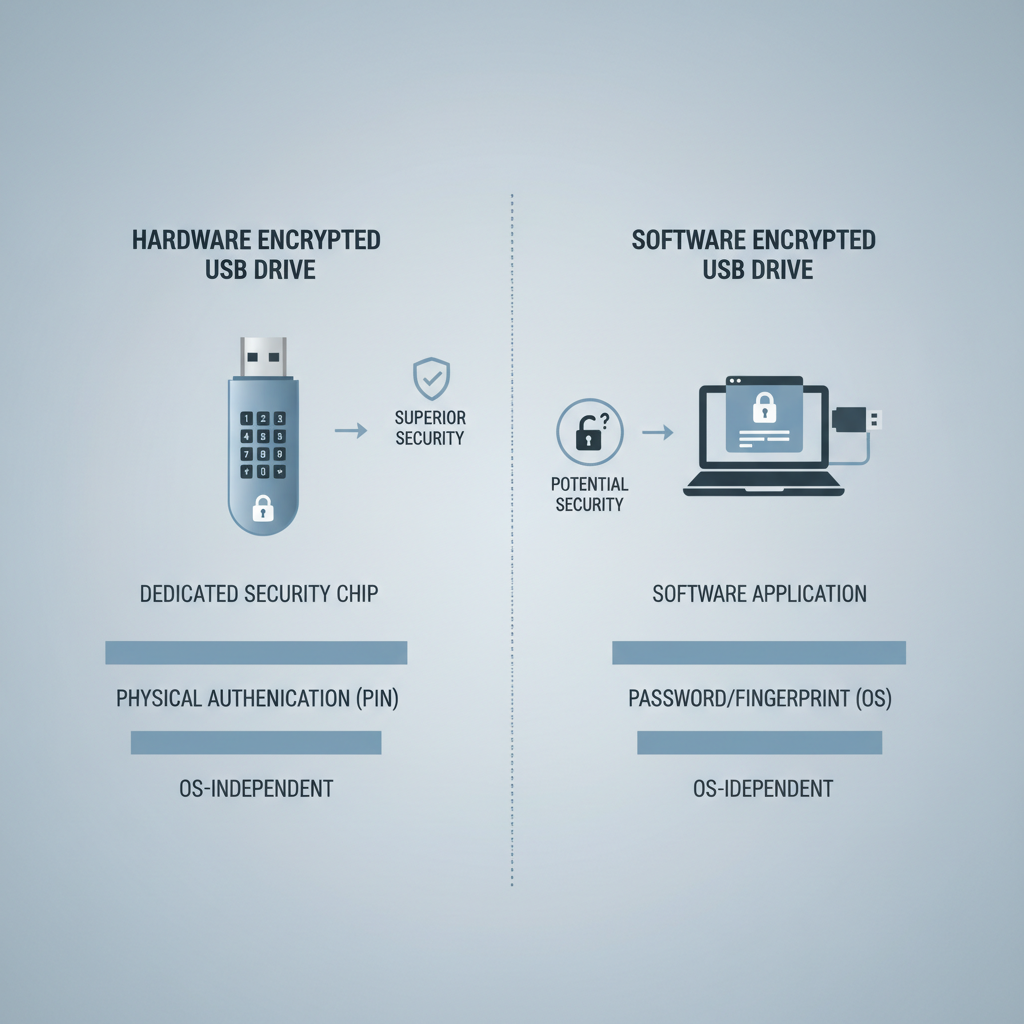
Not all “encrypted USB” claims are equal. In practice, budget options fall into two buckets, and the difference affects both security and convenience.
- Hardware-encrypted drives: encryption happens on the drive itself, often with a PIN keypad or built-in secure controller. This tends to be more resistant to tampering, and you typically don’t need to install software.
- Software-encrypted drives: encryption is handled by an app (sometimes included on the drive). This can be cheaper, but depends more on your computer environment and how the software is maintained.
According to NIST (National Institute of Standards and Technology), AES is a widely used encryption standard, and you’ll commonly see AES-256 referenced for strong protection when implemented correctly. The key phrase is “implemented correctly,” because a label alone doesn’t guarantee quality.
Quick self-check: what type of buyer are you?
Before comparing products, decide what problem you’re solving. Many people overbuy features they never use, or underbuy and end up with a drive they don’t trust.
- You need “grab-and-go” security if you share files across multiple computers (office + home) and can’t install apps. Hardware encryption usually fits.
- You need budget-first protection if the goal is basic “lost drive” risk reduction for personal docs. Software encryption can work if you’re disciplined.
- You need compliance-friendly handling if you deal with client records, contracts, or regulated data. It may be safer to prioritize reputable hardware-encrypted models and clear vendor documentation, and in some cases consult your compliance lead.
One more honest check: if you know you’ll forget passwords, prioritize recovery processes and management tools, not just encryption strength.
How to evaluate budget encrypted USB drives (the short list that actually matters)
Specs get noisy quickly. For best budget usb flash drives with encryption, these are the few factors that tend to decide whether you’ll be happy three months from now.
Encryption approach and unlock method
- PIN keypad: no software install, consistent across devices, but adds cost and bulk.
- Password via software: lighter and cheaper, but can break on locked-down corporate machines.
Certification and transparency
- Look for clear statements about AES implementation, tamper resistance, and documentation that’s easy to find.
- If a listing is vague (“military-grade encryption” with no details), treat it as a yellow flag.
Performance you’ll feel
- USB 3.2 Gen 1 is typically enough for documents and photos.
- If you move large video files, read/write speeds matter more than people expect, encryption can slow cheap controllers.
Durability and day-to-day design
- Metal casing and a protected connector reduce “pocket damage.”
- A keyring hole sounds trivial, until you lose the drive on a trip.
Budget picks framework: what to buy at common price tiers
Instead of pretending there’s one perfect model for everyone, here’s a realistic way to shop by tier. Prices move, so treat these as typical ranges, not guarantees.
| Budget tier | What you can reasonably expect | Who it fits | What to watch out for |
|---|---|---|---|
| Under $25 | Mostly software encryption, basic build | Personal docs, low-frequency use | Outdated apps, unclear encryption details |
| $25–$60 | Better controllers, sometimes stronger vendor tools | Students, freelancers, small teams | “Encrypted partition” claims without transparency |
| $60–$120 | More hardware-encrypted options, stronger usability | Client work, regular travel | Keypad models can be slower for large transfers |
If you’re shopping specifically for best budget usb flash drives with encryption, the $25–$60 range is often where value shows up, as long as the vendor provides current software and clear setup guidance.
Practical setup: how to use an encrypted USB without creating new risks
Encryption helps most when your habits stop undermining it. The setup steps below are intentionally boring, because boring is usually secure.
For hardware-encrypted drives
- Set a PIN that’s not reused elsewhere, and avoid short patterns like 123456.
- Enable auto-lock if the drive supports it, so it locks when unplugged or after idle time.
- Do a test run: lock it, unplug it, try another computer, confirm you can access files reliably.
For software-encrypted drives
- Confirm the software supports your environment (Windows/macOS versions you actually use).
- Create an encrypted container or vault, not just “hidden folders.” Hidden is not encrypted.
- Store a recovery key/password manager entry somewhere separate from the USB drive.
According to CISA (Cybersecurity and Infrastructure Security Agency), strong password practices and secure handling are core parts of protecting sensitive data. Encryption is powerful, but it’s not a substitute for basic operational discipline.
Common mistakes that make “encrypted USB” less effective
This is where people get annoyed, because they bought security and still feel exposed. Usually it’s one of these.
- Confusing password protection with encryption: a locked folder app without encryption can still leak data if the drive is examined directly.
- Reusing the same password everywhere: the drive is only as strong as the password habits behind it.
- Assuming cloud sync is a backup: if you copy encrypted files to a cloud service, confirm whether they stay encrypted end-to-end or become readable after upload.
- Skipping updates: software encryption tools sometimes need updates for OS compatibility and security fixes.
- Buying “too cheap” for the risk: if losing the data would be a serious incident, the lowest tier often brings unclear implementation and support.
When it’s worth getting professional or compliance help
If you handle regulated data (health records, legal documents, financial identifiers), it may be smart to run your choice past IT or a compliance professional. Not because you can’t choose a drive, but because your organization might require specific controls, logging, or approved vendors.
Also consider help if you need shared access across a team, key rotation, remote wipe, or audit trails. Those needs often push you out of “budget USB” territory and into managed encrypted stoRAGe or endpoint security tools.
Conclusion: a smart way to buy for 2026
The simplest win is matching risk to the right level of encryption. If you want minimal friction across devices, a budget-friendly hardware-encrypted drive is often the cleanest approach; if cost is the priority and you control the computers you use, software encryption can still be a reasonable layer.
Pick one drive you can actually maintain, set it up carefully, and do a quick recovery test now instead of discovering issues during a stressful moment later.
Key takeaways:
- “Encrypted” can mean hardware-based or software-based, and the experience is very different.
- For best value, focus on transparent specs, usable unlock method, and reliable vendor support.
- Your habits matter: strong passwords, recovery planning, and consistent locking behavior.
FAQ
- What is the difference between hardware encryption and software encryption on USB drives?
Hardware encryption happens on the drive’s secure controller, often with PIN access. Software encryption relies on an app and your computer, which can be cheaper but sometimes less consistent across locked-down devices. - Are the best budget usb flash drives with encryption good enough for business files?
Many can be, especially for everyday document transport, but “good enough” depends on your risk and any compliance rules. If file loss would be serious, prioritize reputable brands, documentation, and strong lock behavior. - Is AES-256 always safe on a USB flash drive?
AES-256 is a strong standard, but safety depends on implementation, password/PIN strength, and whether the product has credible engineering and support behind it. - Can I use an encrypted USB drive on both Windows and Mac?
Hardware-encrypted models often work more smoothly across OSes. Software-based options vary, so check macOS support and whether admin rights are required before buying. - What happens if I forget the password or PIN?
Many encrypted drives will lock you out permanently after too many attempts, by design. That’s why recovery keys, secure password managers, and a test restore matter. - Does BitLocker or FileVault make a normal USB drive “encrypted”?
It can, if you encrypt the removable drive properly using supported tools. The downside is portability: you may run into access issues on devices without the right permissions or OS edition. - Should I trust “encrypted partition” claims on cheap listings?
Treat vague claims carefully. Look for clear descriptions of how encryption works, what standard is used, and whether the vendor offers current software and documentation.
If you’re trying to choose between a few models and want a quicker short list, it helps to map your use case first, how many computers you’ll plug into, what happens if it’s lost, and whether you can install software, then you can narrow to the best budget usb flash drives with encryption that fit your day-to-day instead of chasing specs.